ICF Volume Profile Pack · NinjaTrader 8

ICF On-Screen Profile — Visible Range Volume Profile for NinjaTrader

A volume profile of the bars on your screen, rebuilt as you scroll and zoom — with volume, buy/sell, delta and TPO modes. Part of the ICF Volume Profile Pack.

Listed vendor on the NinjaTrader Ecosystem NinjaTrader Ecosystem

ICF Volume Profile

Where volume actually traded, period by period, with the levels that matter marked for you.

  • Point of control and value area, extendable forward
  • Volume, buy/sell, delta and tick modes
  • High and low volume nodes
  • VWAP and TWAP with three deviation bands each
  • Up to four independent composites
  • Daily, weekly and monthly periods
Read the ICF Volume Profile guide

ICF TPO Profile

Market Profile by time at price, with the structure a TPO reader looks for drawn on the chart.

  • Letter-cycle TPO with a configurable bracket
  • Point of control and value area, extendable forward
  • Initial balance and opening range
  • Single prints, including the ones stranded mid-profile
  • Poor highs and lows, and excess
  • Four display treatments, from letters to plain blocks
Read the ICF TPO Profile guide

ICF On-Screen Profile

A profile of exactly what is on your screen, rebuilt as you scroll and zoom.

  • Follows the visible chart range
  • Volume, buy/sell, delta and TPO modes
  • Buy and sell figures printed on every row
  • SVA bands, HVN/LVN and AVO on the visible range
  • Daily and last-day anchors when you want it fixed
  • Composites with their own candle and delta markers
See it in the pack
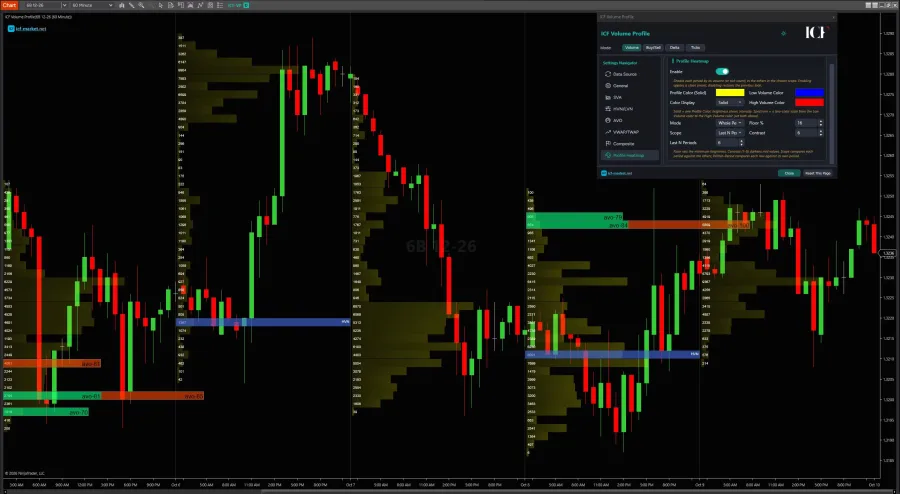
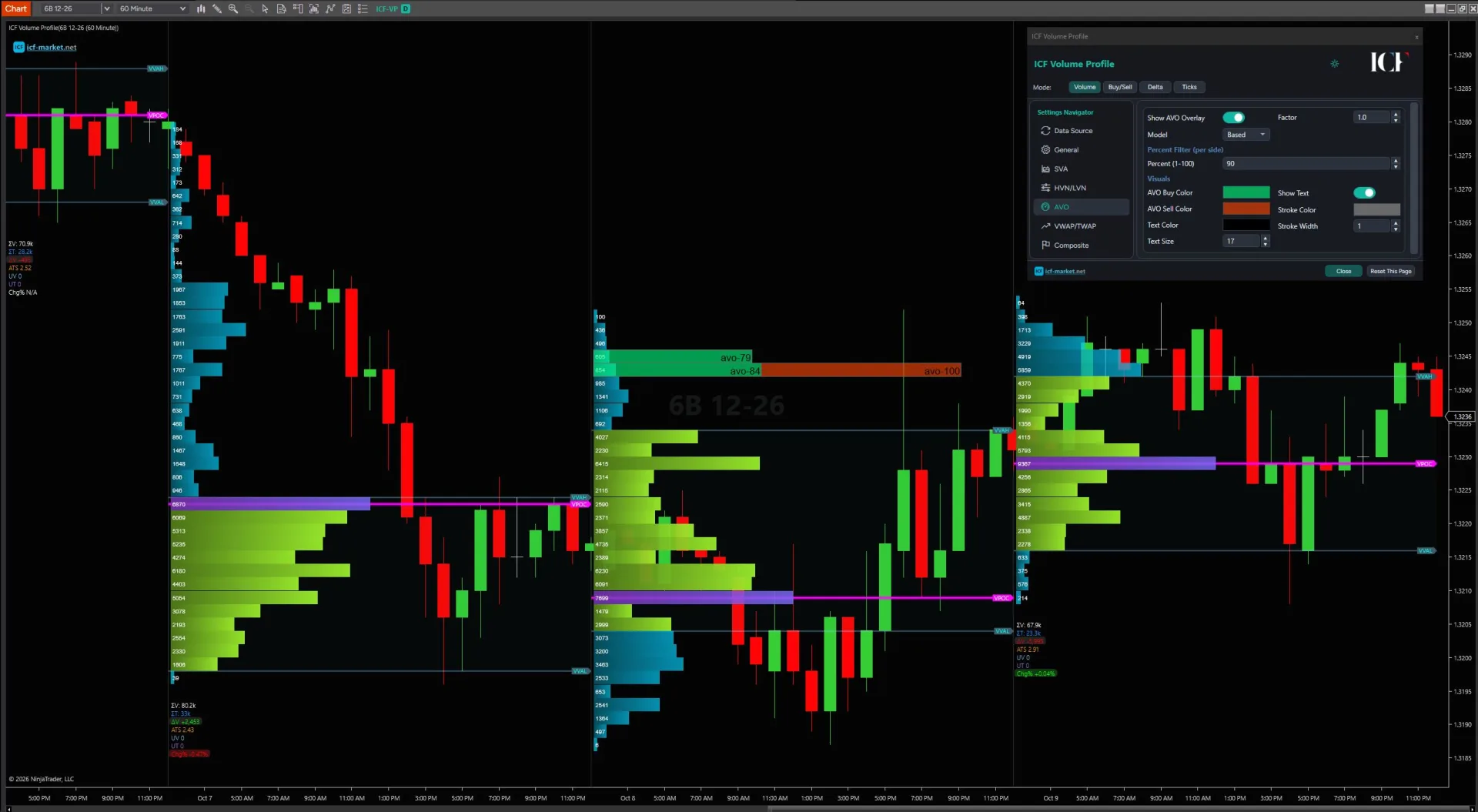
ICF Volume Profile on a NinjaTrader 8 chart: daily profiles with point of control, value area and AVO overlay
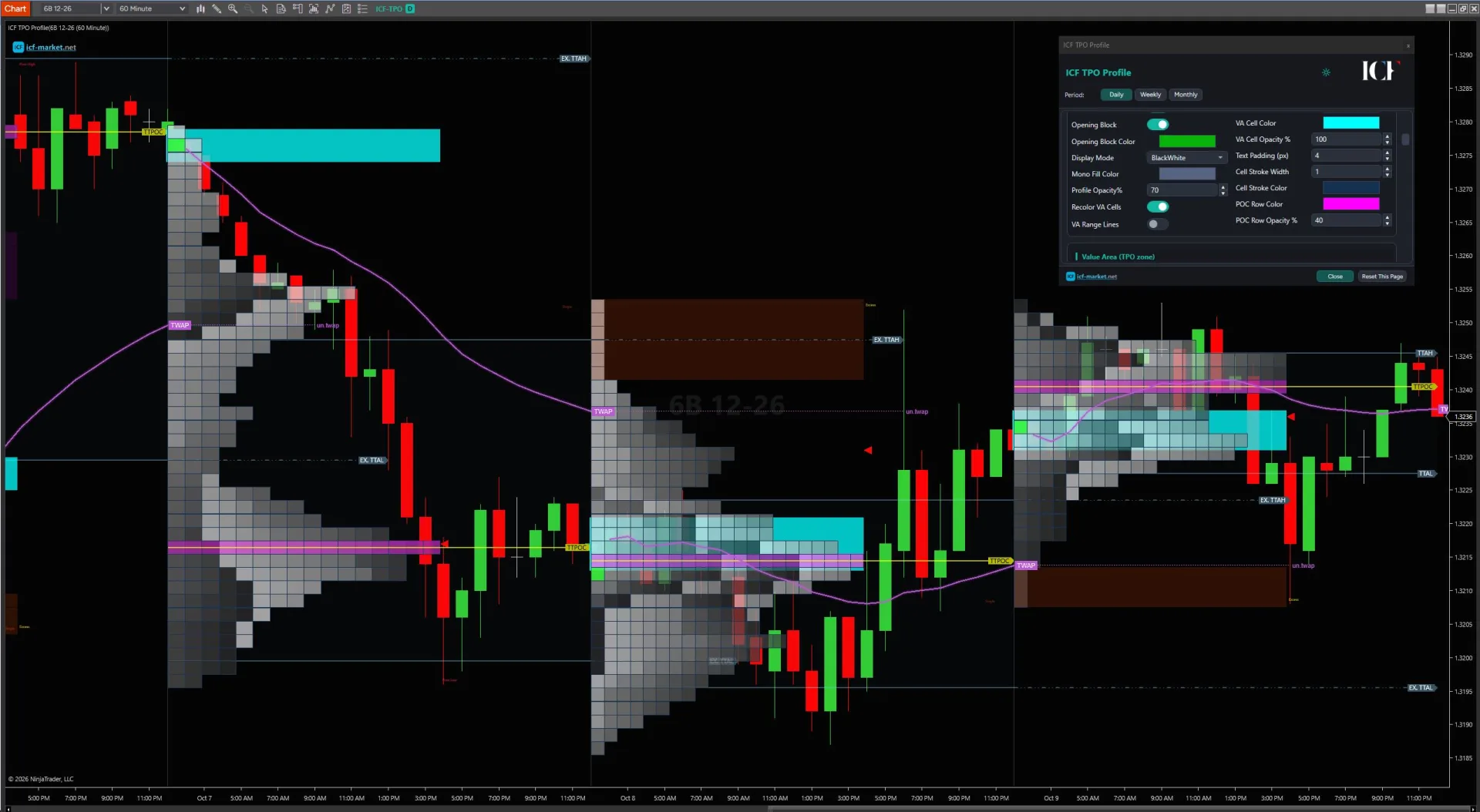
ICF TPO Profile on a NinjaTrader 8 chart: TPO blocks with value area, TPO point of control and TWAP
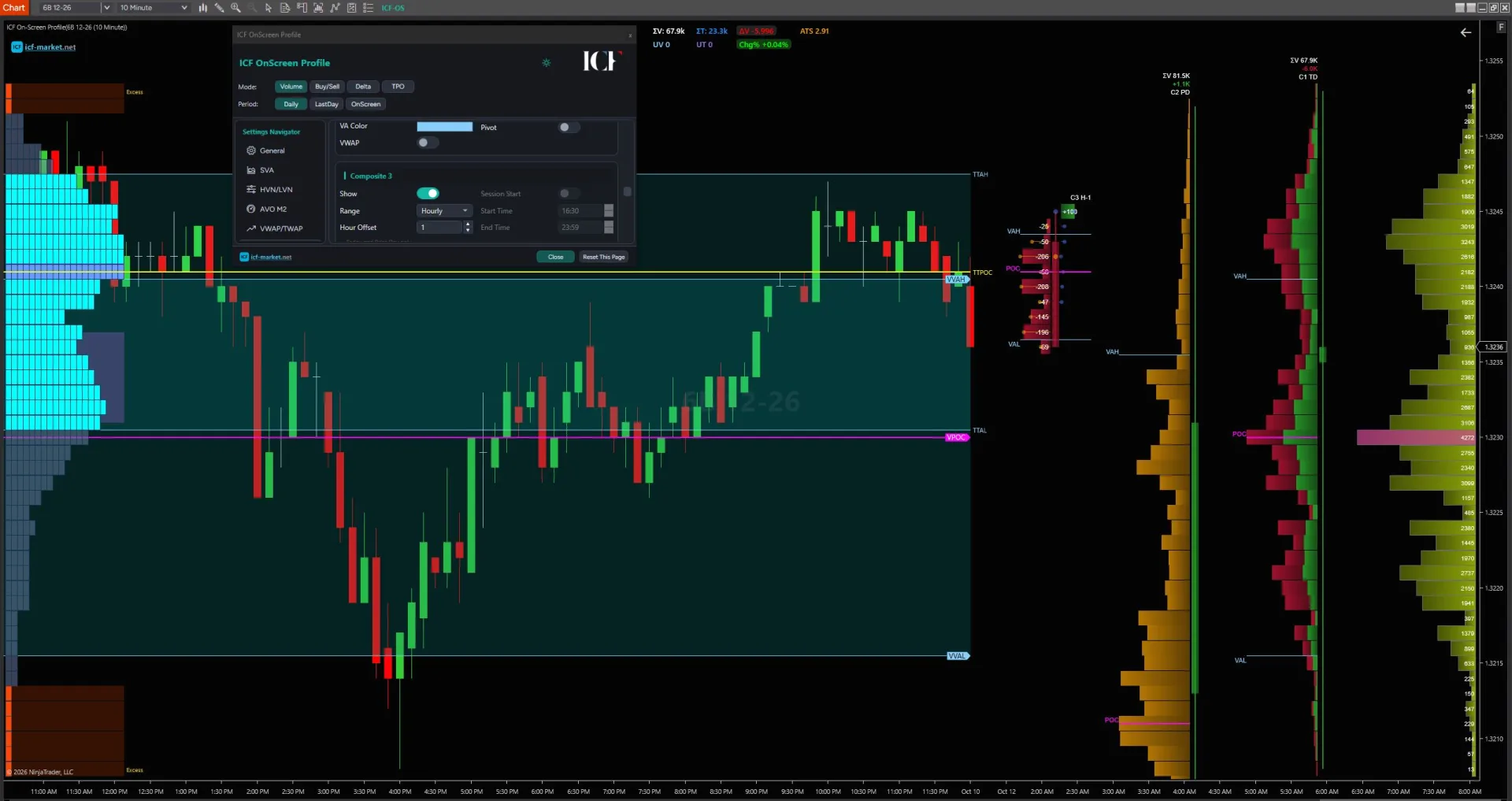
ICF On-Screen Profile on a NinjaTrader 8 chart: visible-range profile with value area and composites

Visible range profiles on NinjaTrader, in depth

What the native viewport profile does, its data, and when ICF is worth a look.

ICF On-Screen Profile built from the visible chart range

Overview

A visible range volume profile builds the profile from the bars currently visible in the chart viewport. In NinjaTrader, the native Order Flow Volume Profile supports this through Composite → Visible Screen Range: the range runs from the first bar in view to the last bar in view, so panning or zooming changes the profiled range.

If that native workflow already gives you the display and resolution you need, it may be all you need. ICF On-Screen Profile is ICF's implementation of the same visible-range / visible-screen-range profiling job for NinjaTrader, intended for traders who need additional workflow or analysis layers documented in the ICF Volume Profile Pack.

  • Start with the native path if: you already have the required Order Flow+ access and the native viewport-following profile covers your workflow.
  • Investigate ICF if: you have a specific requirement that the native tool does not cover and that requirement is supported by the current ICF product specification.
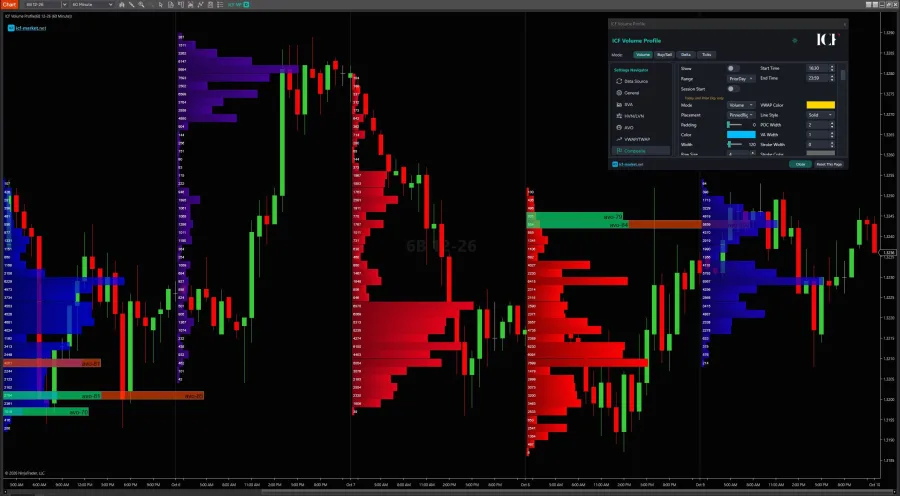
Composite volume profiles across several sessions

What “Visible Screen Range” actually means

In NinjaTrader, Visible Screen Range is a range-selection rule. The profile uses the first bar currently in view through the last bar currently in view. Change the viewport and you change the range being profiled.

That makes it useful when your question is, “What does the volume distribution look like across the exact section of chart I am looking at now?” You can zoom in for a tighter context or zoom out for a broader one without manually redefining start and end points each time.

The important limitation is that the range is viewport-driven. It is not a fixed historical anchor, and it is not a repeating time schedule. It also does not turn the profile into a prediction method; it only changes which chart data is included in the calculation.

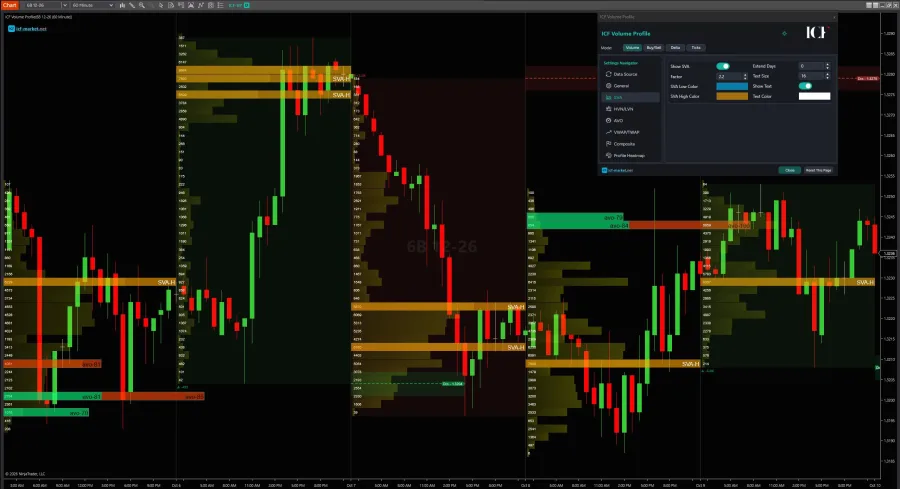
Volume profile with SVA bands

How to use the native NinjaTrader visible-range profile

For the native route, use Order Flow Volume Profile as an indicator and configure the profile period for the visible screen:

  1. Add Order Flow Volume Profile to the chart.
  2. Set Profile period to Composite.
  3. Set Compose by to Visible Screen Range.
  4. Choose Minute or Tick resolution based on the display mode and data detail you need.
  5. Make sure the chart has enough source data loaded for the bars you expect the profile to include.

Once Visible Screen Range is selected, the profile follows the first and last bars in the current view. Panning left or right changes those bounds. Zooming changes how much history is visible, so it can also change the resulting profile.

Order Flow+ access is plan-dependent; verify current NinjaTrader terms.

Visible range vs fixed range vs session or repeating profiles

These range methods solve different jobs. Treat the range rule as the first decision, before comparing display features.

Range method What defines the range What happens when the viewport changes Use case
Visible Screen Range First bar in view through last bar in view The profiled range changes with the visible chart range Interactive analysis of whatever portion of the chart you are viewing now
Fixed/manual range Explicit start and end bounds; NinjaTrader's Drawing Tool is the manual-bounds route The selected bounds remain the reference until you redefine them A stable custom segment you want to keep anchored while viewing elsewhere
Session/period anchored A defined session or other supported period rule The period definition, not the viewport, determines the range Repeated analysis around consistent market/time boundaries
Repeating custom period A separate recurring interval rule would be needed Visible Screen Range does not create an automatic rolling or repeating N-hour profile A different workflow from viewport-following; do not substitute Visible Screen Range for it

ICF Market Volume Profile Indicators Pack

ICF Volume Profile Pack

Read where the market is accepting price, where participation is concentrated, and where the next decision may form.

  • ICF Volume Profile — point of control, value area, nodes, VWAP bands and composites
  • ICF TPO Profile — letter-cycle TPO, initial balance, single prints, poor highs and lows
  • ICF On-Screen Profile — the visible range, rebuilt as you scroll and zoom

$349

one-off · 1 seat · lifetime updates · VAT included

ICF Volume Profile on a NinjaTrader 8 chart with point of control and value area

Data and resolution: what the native profile is actually using

Range selection tells NinjaTrader which bars to profile. Resolution and loaded history affect how that profile is built.

  • Minute resolution: lighter and faster, but approximate in NinjaTrader's implementation. One-minute bar volume is distributed through the bar's price range rather than reconstructed from one-tick records.
  • Tick resolution: uses one-tick data and is more resource-intensive. Native Buy/Sell and Delta display modes require Tick resolution.
  • Loaded chart history matters: data cannot be profiled if it is not available on the chart. If you zoom out and expect older bars to contribute, you may need to increase Days to load.
  • Trading Hours is a filter, not a data source: a Trading Hours setting can filter the chart data that already exists, but it does not create missing historical data.

These are tool-specific NinjaTrader behaviors. They should not be generalized into claims that every Volume Profile implementation requires the same data configuration.

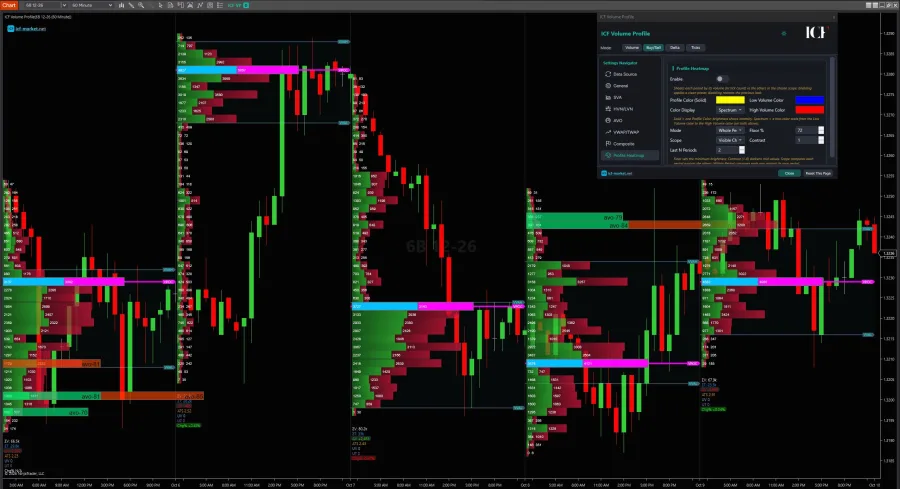
Volume profile heatmap comparing periods on one scale

When native is enough — and when to investigate ICF

Stay native when the native job already matches your requirement

The native path is a strong fit when you want a viewport-following profile, already have the required Order Flow+ access, and the native display/resolution options cover the analysis you actually use.

That is especially true if your main requirement is simply: “profile the bars currently on screen, then update the range as I pan or zoom.” Adding a third-party tool does not improve that decision by itself.

Investigate ICF when you can name the missing workflow

ICF On-Screen Profile follows the visible chart range and rebuilds as you scroll and zoom. In the current ICF product specification, it is part of the ICF Volume Profile Pack and supports OnScreen, Daily, and LastDay period modes plus Volume, Buy/Sell, Delta, and TPO display modes.

The current product page also documents additional profile-analysis and display layers across the pack, including items such as value-area recoloring, SVA, HVN/LVN, AVO, VWAP/TWAP, composites, pivots, and per-range statistics. If one of those capabilities is the reason you are considering ICF, verify its exact scope for the On-Screen workflow on the current product page rather than assuming every pack feature applies identically to every profile mode.

The current ICF product specification lists NinjaTrader 8 or 8.1, Windows, and tick data from the feed as requirements.

The decision is therefore not “native versus paid” in the abstract. It is whether a verified ICF capability solves a concrete requirement that remains after you test the native Visible Screen Range workflow.

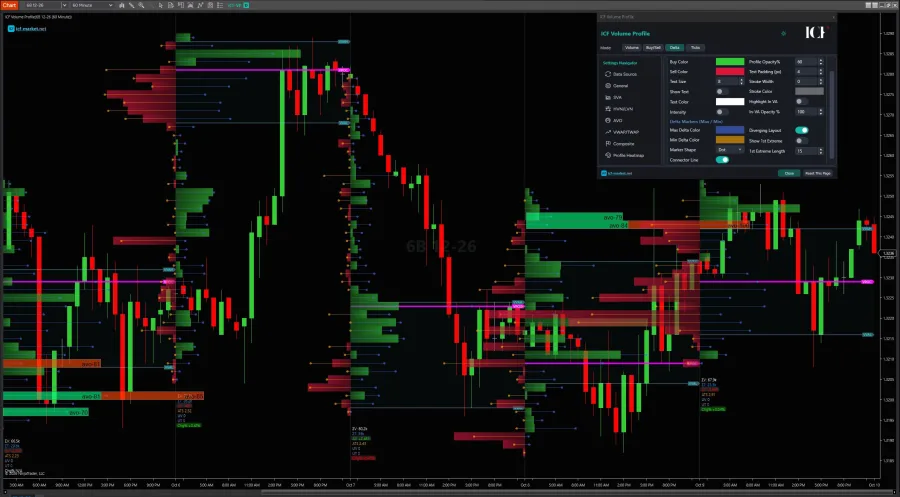
Volume profile with delta maximum and minimum marked

Choose the range behavior first

For a NinjaTrader visible range volume profile, start with the native Visible Screen Range path if you have access to it. It directly solves the viewport-following job and gives you a clean baseline for deciding whether anything is missing.

If your real question expands into period selection, profile types, or broader Volume Profile tooling, move to ICF's general NinjaTrader Volume Profile guidance. If you can name an ICF-specific workflow requirement, review the current ICF Volume Profile Pack specification before deciding.

The useful sequence is simple: choose the correct range behavior, confirm the data/resolution requirement, then add tooling only when a specific workflow justifies it.

Every view in the pack

The same three indicators, set up eight different ways. Scroll the fan, or click a card to open it.

  • Buy and sell volume — ICF Volume Profile
  • Delta mode — ICF Volume Profile
  • Delta max and min — ICF Volume Profile
  • High and low volume nodes — ICF Volume Profile
  • Composite profiles — ICF Volume Profile
  • SVA bands — ICF Volume Profile
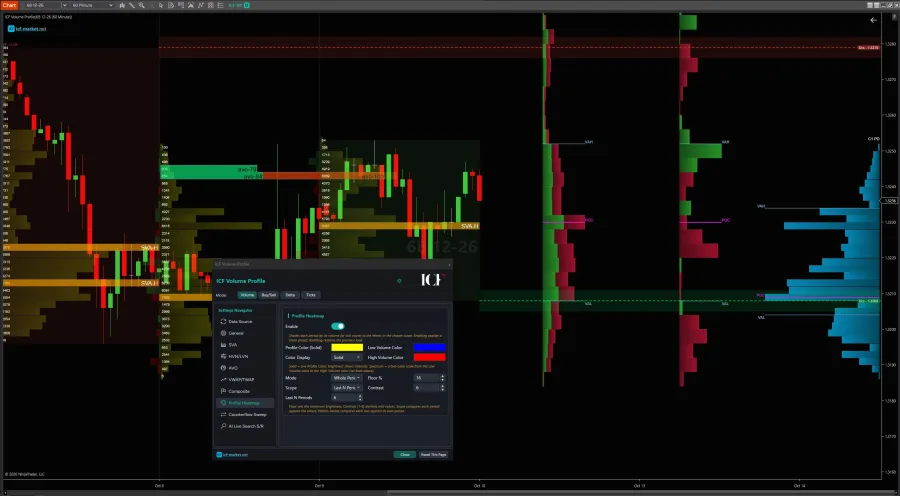
  • Profile heatmap — ICF Volume Profile
  • Split periods — ICF TPO Profile

Our partners

NinjaTrader NinjaTrader Ecosystem Kinetick PropFirmConnector Boxcar Trading

Need more than the native viewport-following workflow?

Review the current ICF Volume Profile Pack specification and confirm that the exact analysis or display layer you need is supported before adding another tool.

Explore ICF Volume Profile Indicators Package